
Workbrew 2.0 release notes
Luke Hefson
Workbrew 2.0 sees more of the open source running your company than Homebrew alone, and patches vulnerable packages and extensions for you. Roll it out across the fleet for visibility without changing a thing on anyone's Mac, then turn management on when you're ready. The Workbrew app is now available, so everyone in the company can get software without a terminal. And our new plans give you more at every size.
What's in this release
- New plans
- Visibility beyond Homebrew
- Vulnerability Patching for npm packages and VS Code extensions
- Commands for npm packages and VS Code extensions
- Automatic Uninstalls and Automatic Upgrades are now separate policies
- Read-only deployment
- The Workbrew app
- Invite a device
New plans
We've sized our new plans so you pay for what you need when you need it.
- Team is for small and medium-sized organizations, and it's free with no limit on devices or users. It's everything you need to see your fleet and get software onto it. That means Homebrew deployed through your MDM, an inventory with vulnerability counts across every source, the Workbrew app, default packages, MDM connections, the API, notifications, and weekly reports. Allowed domains moved to Team too, for improved identity & access management across all plans.
- Vulnerability Patching is an upgrade to Team, for teams that want a simple way to close known vulnerabilities reliably. Set a severity threshold per source and Workbrew patches everything above it.
- Governance is an upgrade to Team, for teams that want to decide what gets installed and have policies with enforcement. Governance includes Vulnerability Patching and adds allow lists, forbid lists, package requests, commands, and automatic uninstalls. Many of these features previously required our highest Workbrew tier and are now available for the first time to smaller teams.
- Business gives organizations with multiple teams self-serve access to Workbrew's most advanced features, with transparent pricing and a free 14-day trial. Sync device groups from your MDM and set different policies, default packages, and automatic upgrades for each group. Business also adds roles and permissions, activity logs, data exports, webhooks, and private taps for distributing internal tools.
- Enterprise is still available for the largest organizations with additional access control requirements, and adds advanced SSO, custom terms and security reviews, an SLA, volume pricing, and a dedicated solutions architect.
Team and its upgrades treat your fleet as one unit. Every policy applies to every Mac. As you grow your fleet and different groups of Macs need different rules, Workbrew Business introduces device groups with more sophisticated configuration possibilities. Compare all of the plans at workbrew.com/pricing.
Visibility beyond Homebrew
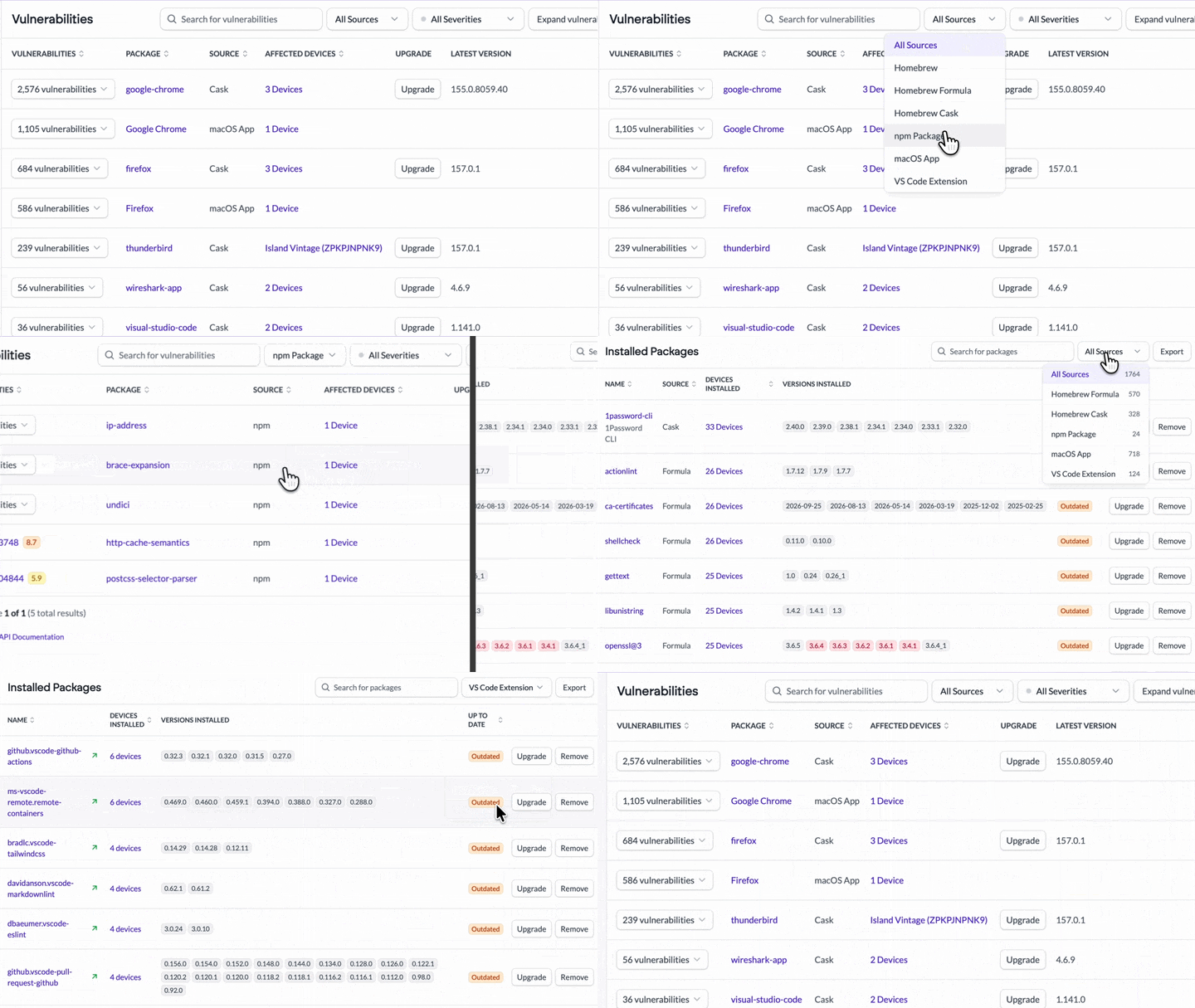
Workbrew 2.0 adds npm packages, VS Code extensions, and macOS apps to the 16,000 Homebrew packages Workbrew already inventories, so you can see far more of the software installed across your fleet. Workbrew's VS Code extension support covers any editor built on the VS Code extension API, such as Cursor, Google Antigravity, and Windsurf.
The Packages and Vulnerabilities pages now bring every source together in one view, giving you more coverage than ever before. Search for any package to see which Macs have it installed, and see which packages carry known vulnerabilities, whether they came from Homebrew, npm, or an editor extension. Your inventory and vulnerabilities across every source are also available through the Workbrew API.
For Admins:
- Know what's installed on every Mac, whoever installed it and however they installed it.
- Find every Mac with a given npm package, extension, or app from one search.
For Your Team:
- Nothing changes on your Mac. Workbrew reads only what software is installed and doesn't manage it unless your organization chooses to. Learn how Workbrew works for developers.
Visibility beyond Homebrew is available on all plans, including alerts when installed packages have known vulnerabilities. Vulnerability details, including CVEs and affected devices, come with Team + Vulnerability Patching and above, so you can remediate issues.
Vulnerability Patching for npm packages and VS Code extensions
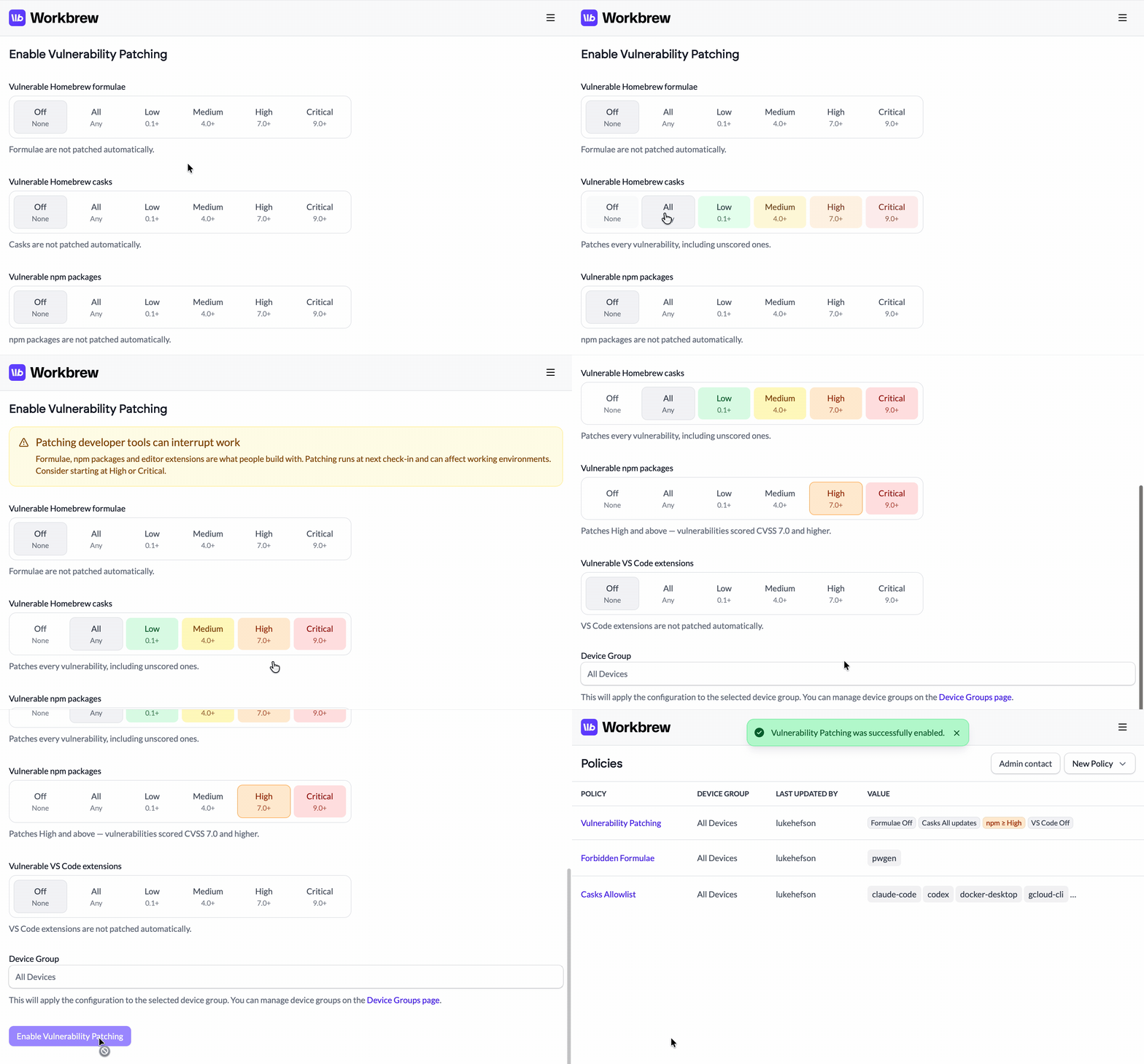
Workbrew 1.11 enhanced Vulnerability Patching with policy-based severity thresholds. In Workbrew 2.0, you can now set a threshold for each package source, and Workbrew patches npm packages and VS Code extensions alongside Homebrew formulae and casks.
Additionally, Workbrew now inventories macOS apps and checks them for vulnerabilities. In an upcoming release, admins will be able to bring macOS apps under Workbrew management, so Workbrew can patch them automatically.
For Admins:
- Close known vulnerabilities in npm packages and extensions.
- Customize policies per source to fit your organization's patching needs.
For Your Team:
- Vulnerable packages get patched automatically, before they can cause an issue.
Vulnerability Patching for Homebrew, npm, VS Code extensions, and macOS apps is available on Team with the Vulnerability Patching upgrade and above.
Commands for npm packages and VS Code extensions
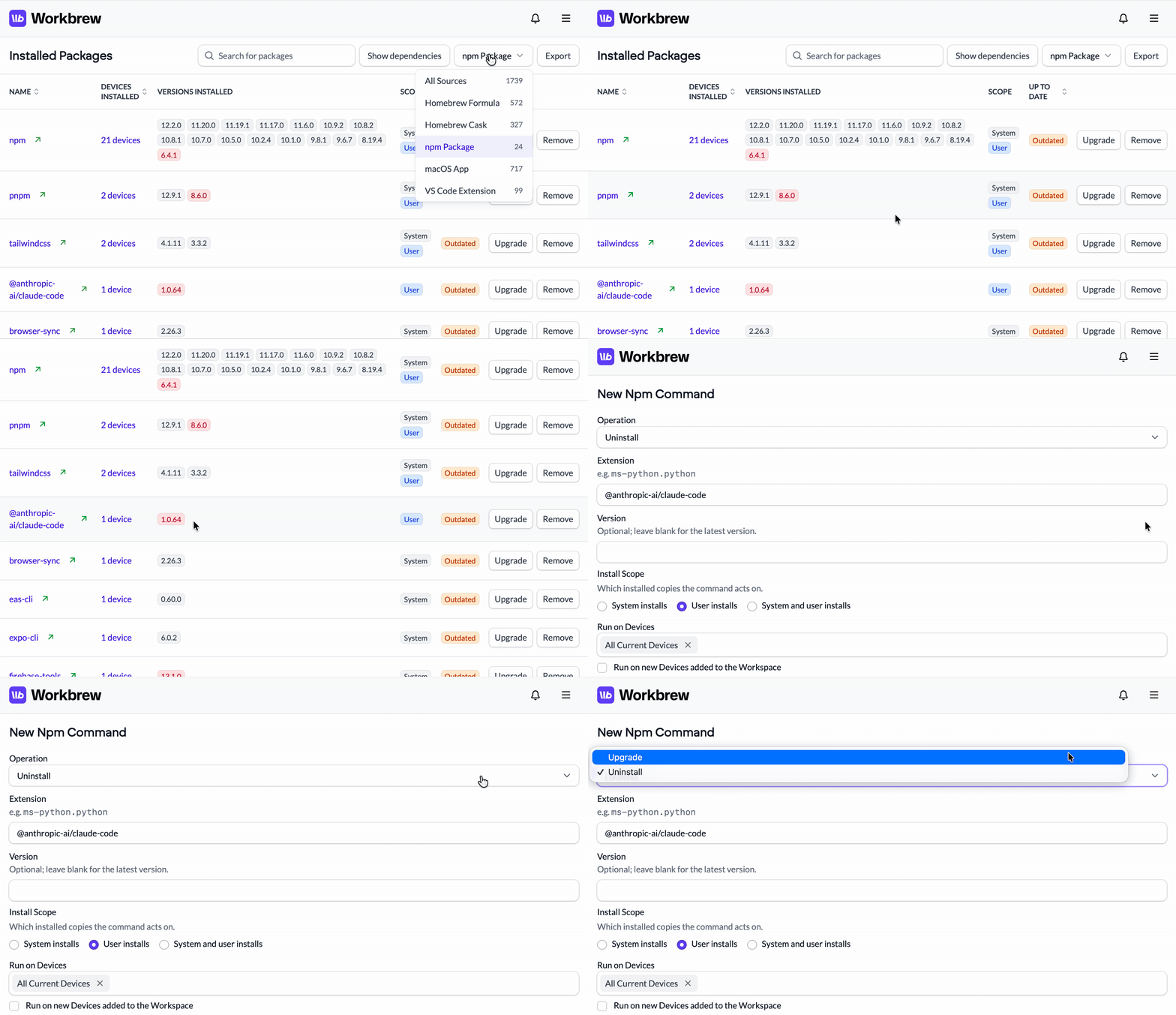
"Brew Commands" are now "Commands", and Workbrew gains management support for npm packages and VS Code extensions: upgrade or remove a named package from any Source across the fleet, a device group, or one Mac. Command runs are logged and you can review the run output.
Commands are the ideal tool for one-off, remote operations, like removing a vulnerable package before a patch exists.
For Admins:
- Remove or upgrade a specific npm package or extension everywhere, from one place.
For Your Team:
- Fixes target only the package that needs it, on only the Macs your admin chooses.
Commands are available on Workbrew Team + Governance, Workbrew Business, and Workbrew Enterprise.
Automatic Uninstalls and Automatic Upgrades are now separate policies
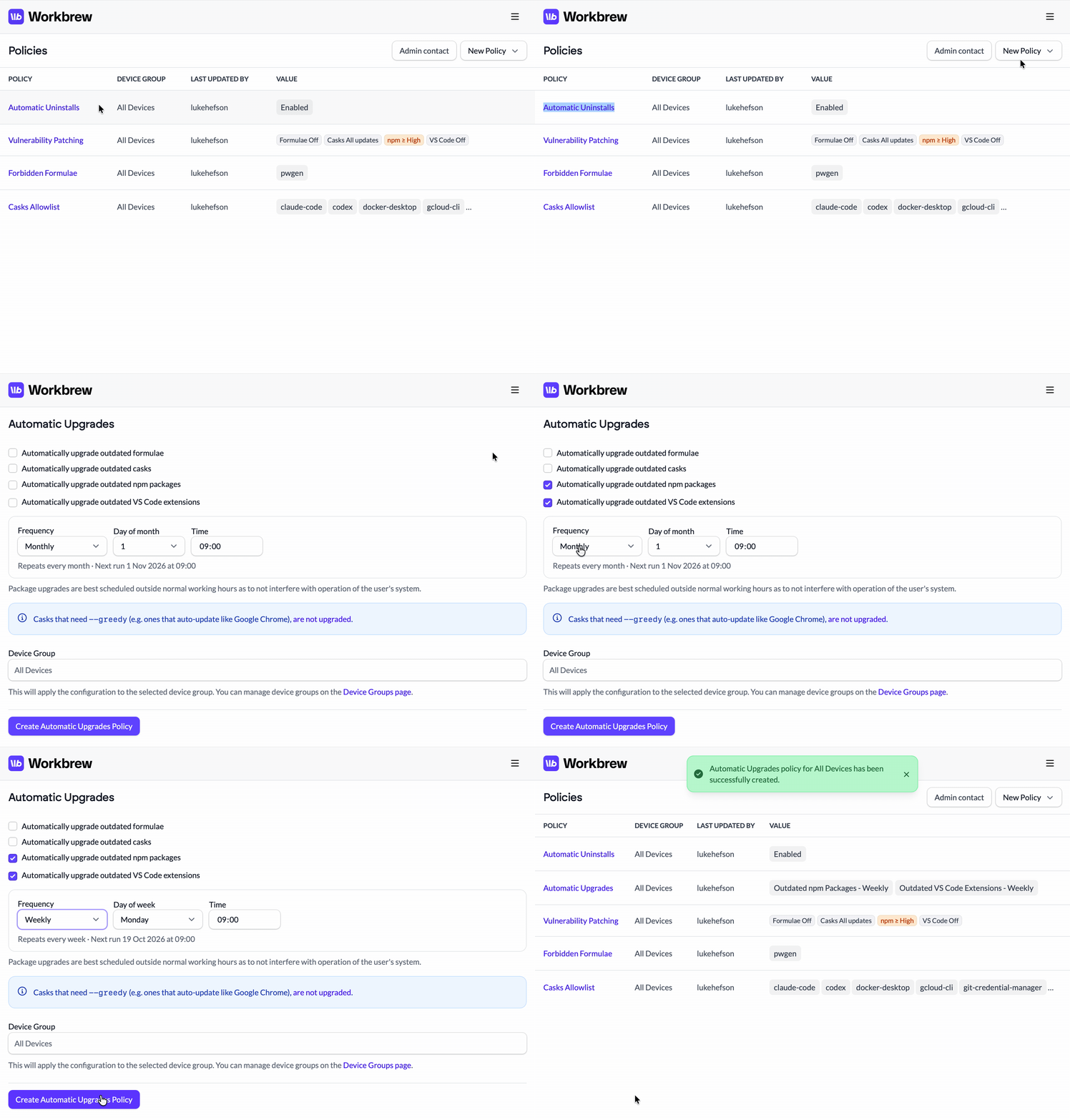
The existing Automatic Upgrades and Uninstalls policy is now split into two separate policies, to give admins additional flexibility and control.
Automatic Uninstalls removes forbidden software from a Mac, and it's now part of the Team + Governance upgrade, alongside the forbidden policies it enforces. Forbid a software package, and Workbrew removes it from every Mac that has it and prevents it from being installed.
Automatic Upgrades keeps outdated software patched whether or not it's vulnerable, on the schedule you set. It now covers npm packages and VS Code extensions as well as Homebrew formulae and casks.
If you were previously using this policy, the Workbrew Console will automatically split it into two policies with the same settings.
For Admins:
- On Workbrew Team + Governance, forbidden software is removed from the fleet as well as blocked.
- On Workbrew Business, outdated npm packages and extensions upgrade on the same schedule as everything else.
For Your Team:
- Only software your admin has explicitly forbidden is removed.
Automatic Uninstalls are available on Team + Governance and above. Automatic Upgrades is available on Workbrew Business and Workbrew Enterprise.
The Workbrew app

The Workbrew app is now available. It's the best way for people who don't live in a terminal to get software from Workbrew.
Browse the Workbrew Catalog, install what you need, and keep it up to date. Your Workbrew policies apply in the app just as they do on the command line, so admins keep the same control over what gets installed.
Everyone sees the software your company has approved, and can request anything else they need. Admins review requests in the Workbrew Console, and users are notified in the app when there's a decision.
For Admins:
- Everyone in the company can get software from Workbrew, no terminal required.
- Review and approve package requests in line with your organization's controls.
For Your Team:
- Self-serve installation and updates for approved software.
- A beautiful native experience, no command line required.
The Workbrew app is included on all plans and requires macOS 26 or later. It's on by default in new workspaces, and admins of existing workspaces can turn it on from the Workbrew Console; see Enable the Workbrew app. The approved catalog and Package Requests come with Team + the Governance upgrade and above.
Invite a device

Getting started and testing Workbrew used to require setting up a near-production install in your MDM. Now you (or someone else you invite) can enroll their device into Workbrew via a link and the Workbrew App. No preinstall script, and no complex setup. It's perfect for exploring Workbrew before a larger deployment, or for one-off additions outside of your MDM.
Invite a device is available on all plans.
Read-only deployment
Installing Workbrew used to mean adopting Homebrew into management immediately. That's a bigger step than some teams want to take before they've seen what's on their fleet.
Starting with Workbrew 2.0, new installations are read-only by default. Install Workbrew across your fleet and you get a full inventory with known vulnerabilities flagged, while Homebrew and everything else on each Mac stays exactly as it is. Macs without Homebrew can now enroll in the Workbrew Console too, and report their npm packages, VS Code extensions, and macOS apps.
When you're ready to deliver software, enforce policies, and patch vulnerabilities, turn on Homebrew management for your workspace. The Homebrew Management documentation covers everything you need to know.
For Admins:
- Roll out Workbrew for visibility first, and turn on management when you're ready.
- Try policies on one Mac before the fleet.
For Your Team:
- Your Homebrew setup stays exactly as it is, so your admin gets visibility without disrupting your work.
Read-only deployment is available on all plans. Workspaces that existed before 2.0 are already managed and aren't affected.
And that's Workbrew 2.0. If you've got thoughts, we want to hear them.
Want this in your inbox next time? Subscribe for release notes as they're published.
Read the Workbrew 2.0 announcement.