
Workbrew 1.9 release notes
Luke Hefson
The theme of Workbrew 1.9 is reducing the repetitive parts of fleet management: reducing repetitive workflows, and increasing the signal to noise ratio to help you focus on what actually needs your attention.
Managed Brew CLI Access
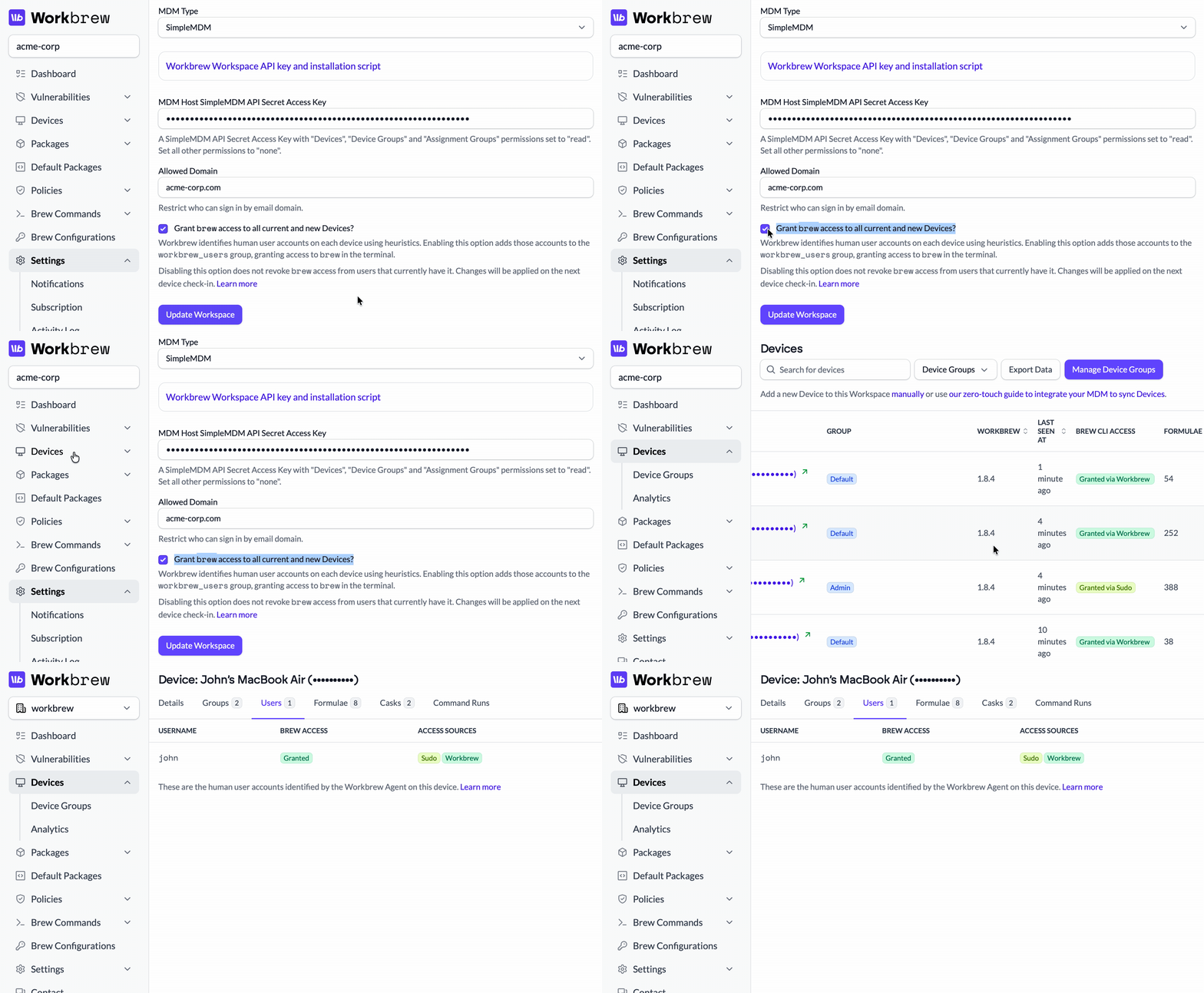
Managing brew CLI access has always been more complicated than it should be. Admins had to wrangle the workbrew_users group via MDM scripts, even after deploying Workbrew. The Console reported an "access mode" — but didn't actually enforce it on devices. Users reported it was confusing, and we agree.
Workbrew 1.9 fixes this. Granting fleet-wide brew CLI access is now as simple as a single checkbox in Workspace settings.
There are two important parts to this improvement:
- The Console now detects and displays the human user accounts on each device,
so you can see who's actually using each machine. And if they have access to the brew CLI, the Console now reports how it was granted to them. 2. The old "Access Modes" concept has been removed entirely. It was unintuitive
and, now, unnecessary.
We published a dedicated post covering the full details of how managed brew access works.
For Admins:
- Set brew CLI access globally, directly from the Console
- View human user accounts on each device
- Access Modes are gone; the Console enforces what you configure
For Your Team:
- The barrier to entry for giving your Standard users access to secure, managed Homebrew is even lower than ever!
- More predictable behavior so that brew works when it should, and doesn't when it shouldn't
Managed brew CLI access is now available on all plans.
Workspace Health Notifications
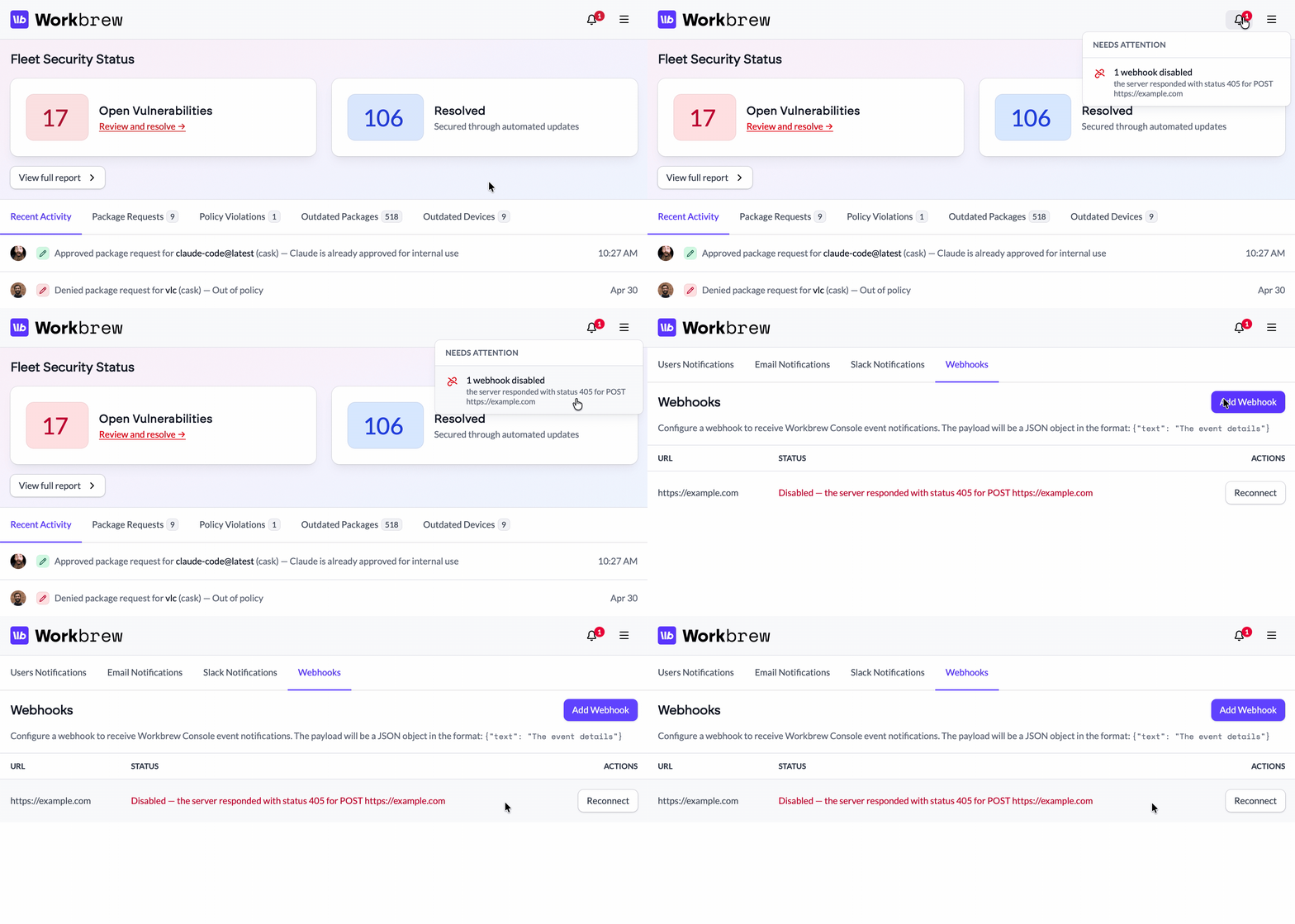
If a workspace integration breaks, a Private Tap becomes unreachable, or a GitHub connection drops, there wasn't a great way to know if something downstream of the Console had started failing and debugging the info was a hassle.
Now, a new notification bell surfaces integration issues proactively. It appears in the Console navigation only when something needs attention and provides a direct link to the fix. It won't be dismissed until the issue is resolved.
For Admins:
- Know immediately when a workspace integration needs attention
- Jump directly to the fix without digging
Workspace health notifications are now available on all plans.
Searchable device targeting
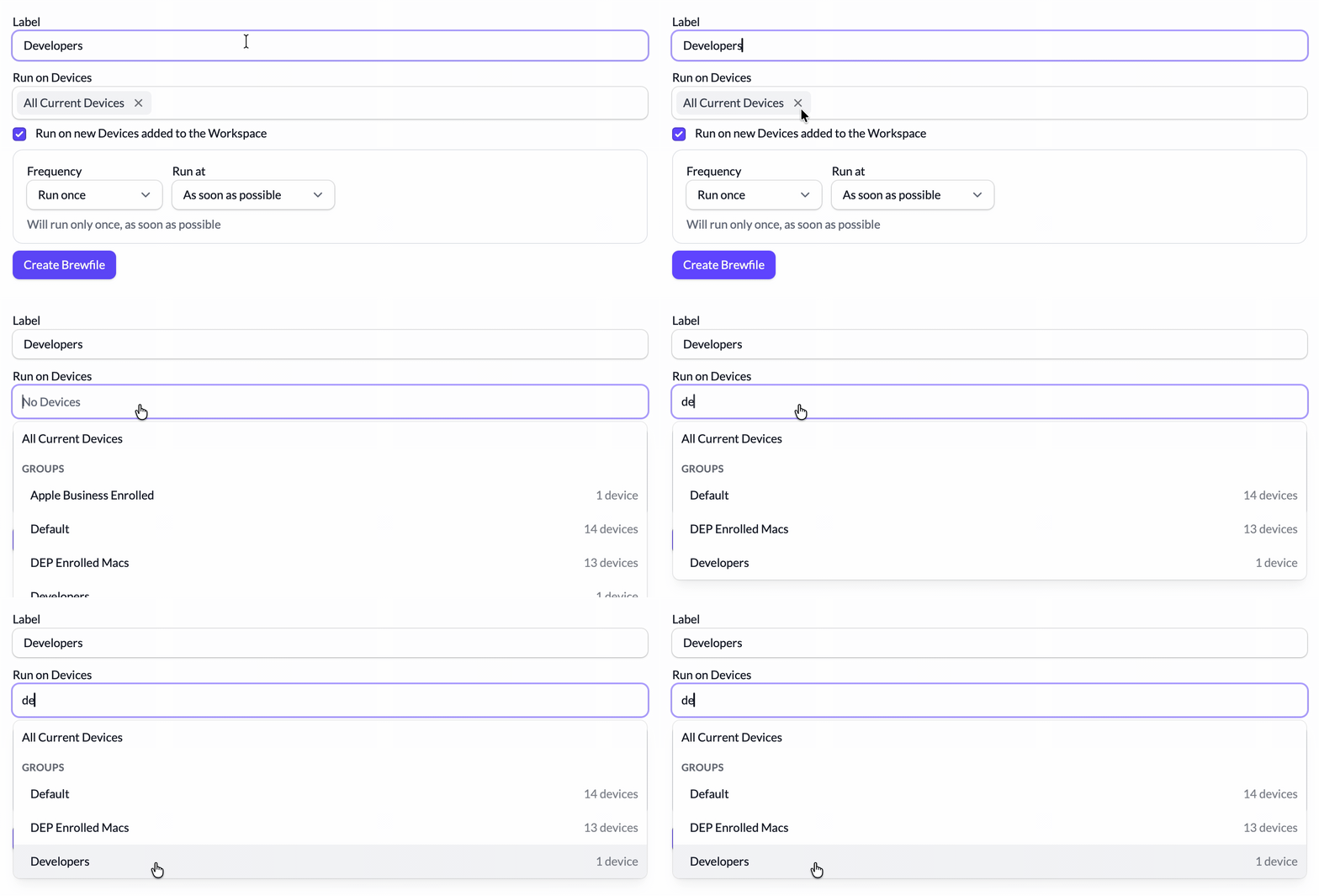
Finding and targeting the right group of devices in a long list for synced groups is now a ton easier.
The device and group picker is now a searchable combobox. Just type to filter, or browse with the full list shown upfront.
For Admins:
- Focus on deploying configurations only to relevant groups, while ignoring unused ones
- Spend less time wading through group noise and more time delivering the right policies to the right devices
Searchable device targeting is now available on all plans.
Bulk Package Operations
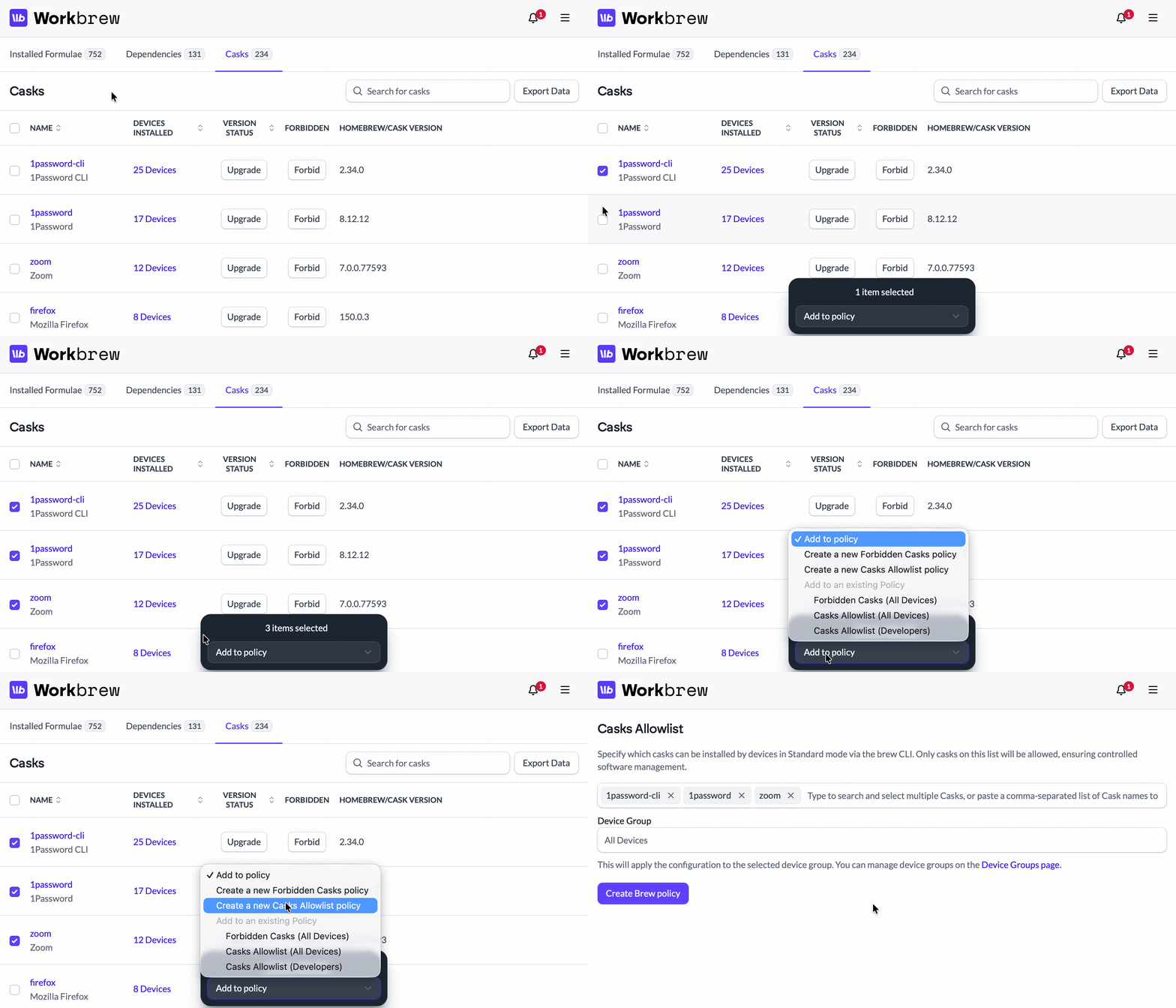
Building policies package by package is fine until you have a hundred packages to deal with. In Workbrew 1.9, you can multi-select packages and add them to a policy in a single action.
The Console also suggests policies based on whether a package is a formula or a cask — different types, different defaults — and when you're creating a new policy from scratch, relevant packages from your selection are pre-populated.
For Admins:
- Select multiple packages and add them to a policy in one action
- Get policy suggestions based on package type
- Preselected packages when creating a new policy from the catalog
Bulk package operations are now available on Pro and Enterprise plans.
Command Run Improvements
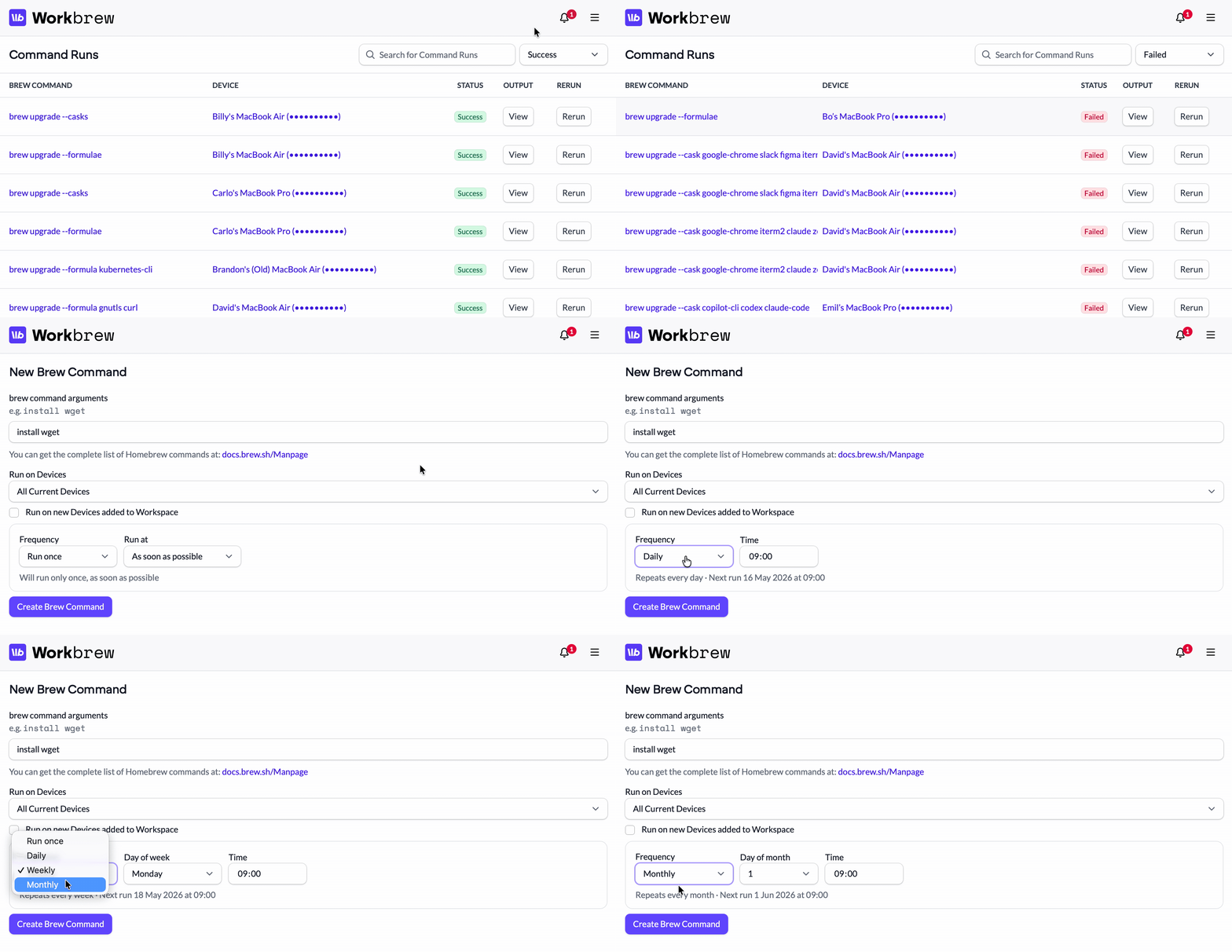
The split between "automated" and "on-demand" command run tabs added more cognitive overhead than it was worth. It's now a single consolidated view so that you can quickly track down the source of a given command run. The status column has been expanded too so that you can see the full picture for a run at a glance without clicking into individual records.
Scheduling a command also got a rework: time selection is now a step-by-step wizard rather than a single, complicated form, and device group selection is searchable — which is useful once you have more than a handful of groups.
For Admins:
- One view for all command runs
- More comprehensive status information without drilling in
- Step-by-step scheduling and searchable device group selection
Command runs improvements are now available on Pro and Enterprise plans.
Private Taps: Untap
You've been able to connect a Private Tap from the Console for a while. But removing one was a different story, as it required going outside Workbrew entirely. You can now untap directly from the integration page.
For Admins:
- Remove a Private Tap without extra manual steps
- Complete lifecycle management for Private Taps in one place
Private Taps are available on Enterprise plans.
That's Workbrew 1.9. As always, we'd love your feedback — reach out and let us know what you think.
Not on our mailing list yet? Subscribe to get release notes delivered to your inbox.