
Managed Brew Access
Joe Nash
A common pattern on managed macOS fleets looks something like this: developers run as Standard users, Homebrew needs elevated privileges for parts of its installation and maintenance workflow, and IT teams end up stitching together temporary admin access through MDM scripts or a PAM solution.
That arrangement usually works, but it has a few awkward edges. Admin elevation flows are often broader than they need to be, local admin membership tends to linger longer than intended, and troubleshooting becomes harder because the system managing brew access is disconnected from the system managing the rest of the device.
Workbrew already improved parts of this flow by allowing Homebrew CLI access for Standard users, without granting full local admin privileges. In practice though, enabling that access still required administrators to find and add users to the workbrew_users group through MDM scripts.
Managed Brew Access closes that gap. It moves brew access management into Workbrew itself, so the Console state and the device state are describing the same thing.
The old workflow
Before Managed Brew Access, granting brew access in a Workbrew-managed environment usually meant coordinating two separate systems. Workbrew handled package management, Brewfiles, telemetry, and policy enforcement. Separately, an MDM script managed the local workbrew_users group to determine which users could actually use the brew CLI.
A device could appear correctly configured in the Console while still lacking functional brew access locally. A newly enrolled machine might receive Workbrew immediately, but not receive the correct local group membership until another script is executed later. Different MDM platforms handled this differently, which meant support and onboarding behaviour varied between environments.
The configuration itself was also easy to drift. Many teams ended up with shell scripts containing commands such as:
dseditgroup -o edit -a "$USER" -t user workbrew_users
Over time those scripts accumulated exceptions for shared devices, temporary contractors, migration scenarios, or local account naming inconsistencies. None of that logic was visible from the Workbrew Console, even though the outcome directly affected whether Workbrew actually worked for the user sitting at the machine.
What Managed Brew Access changes
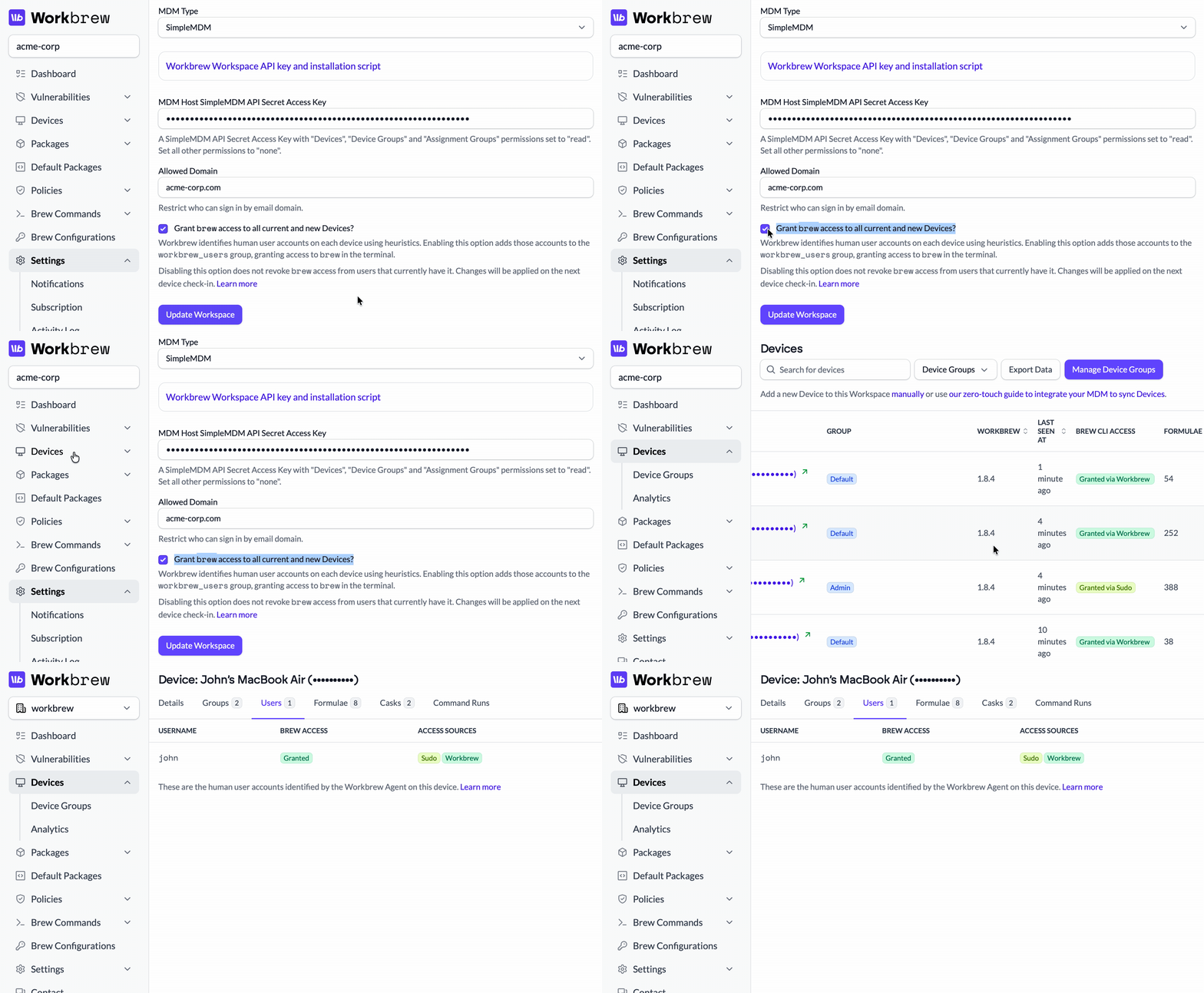
Managed Brew Access moves user access management into Workbrew's device configuration model. Instead of separately managing workbrew_users, administrators can now configure brew access policies directly through Workbrew. Devices enforce those policies locally, and the Console reflects the state that is actually intended to exist on the machine.
This changes the system behaviour in a few useful ways. First, deployment becomes simpler. Once Workbrew is installed, brew access can be managed without additional MDM scripting glue. The access model becomes part of the Workbrew configuration itself rather than an adjacent provisioning workflow.
Second, the Console stops representing a partially enforced state. Previously, an administrator could configure a desired mode in Workbrew while relying on external scripts to make the device match that configuration. Managed Brew Access removes that split responsibility.
Third, access management becomes narrower in scope. Teams no longer need to temporarily elevate users into local admin groups simply to allow Homebrew usage. The device can permit brew operations without broadening privileges elsewhere on the system.
How it works on the device
Under the hood, Workbrew continues to rely on the workbrew_users group locally. But now, the Workbrew agent reconciles access policy from the Console and updates local membership automatically. Devices periodically converge toward the configured state in the same way they already do for package state and Brewfile enforcement.
That convergence model is important operationally because it means brew access behaves consistently with the rest of the Workbrew platform. Administrators are no longer maintaining a second synchronization mechanism through custom scripts.
In practice this also improves troubleshooting. If a user reports that brew install fails unexpectedly, administrators can inspect the device state directly through Workbrew rather than tracing through MDM execution history or trying to determine whether a provisioning script actually ran.
Standard users and Homebrew
Many organizations intentionally avoid permanent local admin access because it widens the blast radius for accidental system modification and credential misuse. At the same time, developers and technical users still need package management tools that behave predictably during day-to-day work.
That tension pushes many teams toward temporary admin elevation workflows. A developer needs to update a formula, the system prompts for escalation, an admin token gets issued briefly, and then hopefully revoked later.
Managed Brew Access keeps the operational model narrower. Users can interact with Homebrew without receiving broader local administrative privileges that extend beyond package management itself.
For teams already standardizing on Workbrew, that also means fewer moving parts around onboarding. Devices that receive Workbrew configuration can receive brew access through the same control plane, rather than requiring separate enrollment logic to make the CLI usable.
Simplified deployments
For teams already using Workbrew, enabling Managed Brew Access means simplifying infrastructure rather than adding more. Existing MDM scripts that manipulate workbrew_users can often be removed entirely. Temporary admin workflows built specifically around Homebrew access become less necessary. New device enrollment paths get shorter because fewer systems are coordinating access behind the scenes.
The resulting setup is simpler mostly because the responsibilities are more clearly separated. MDM remains responsible for device enrollment and baseline management. Workbrew becomes responsible for Homebrew access and package state. The system enforcing brew policy is now the same system presenting brew policy to administrators.
Whether you're managing a handful of Macs or an entire fleet, Managed Brew Access is included on every plan, even free. Create your Free Workspace and hit the ground running with our documentation.