Workbrew 1.7 release notes
Luke Hefson
Workbrew 1.7 improves how the Console understands and attributes activity across your workspace.
This release introduces catalog syncing for Private Taps, clearer ownership and structure for Brew Commands, an Activity Log, and local timezone support for timestamps. Together, these changes make internal tooling easier to manage and administrative actions easier to audit.
Activity Log
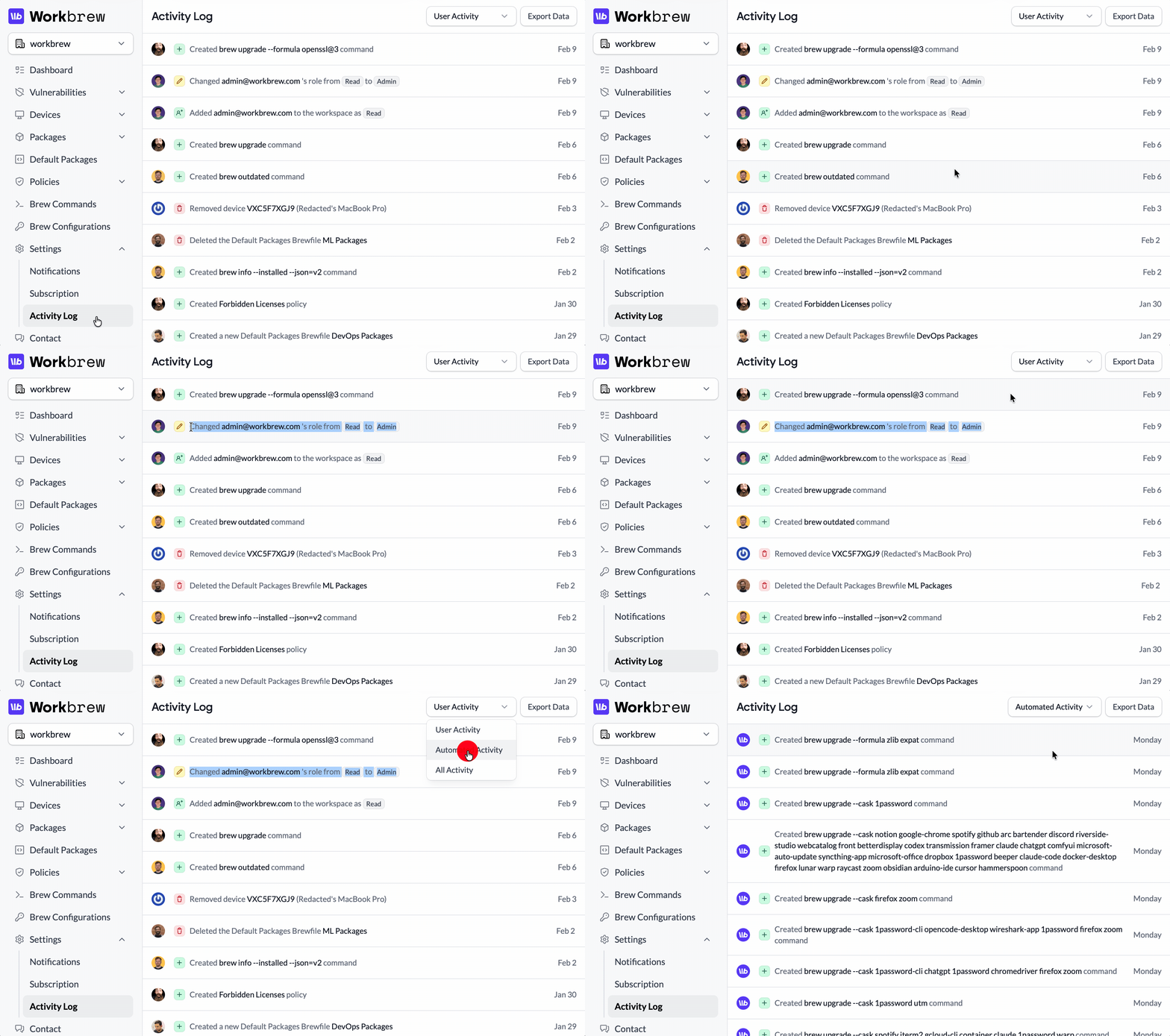
The Activity Log provides a structured record of changes across your workspace.
Workbrew now tracks create, update, and destroy events for key resources including:
- workspace membership,
- devices,
- Brew Commands,
- Default Packages (Brewfiles),
- Policies,
- installed packages,
- vulnerability changes.
Each event includes the actor, the affected resource, and the relevant change details. Filtering and export options make it easy to review activity over time, share audit data with stakeholders, or send events to your SIEM via the Workbrew API.
For Admins:
- Audit membership changes, role updates, and access grants or revocations.
- Track device lifecycle events.
- Monitor Brew Command, Default Packages, and Policies changes.
- Review vulnerability detection and remediation events.
- Export activity data for reporting or compliance.
For Your Team:
- Greater transparency into operational changes.
- Clearer accountability around administrative actions.
Activity Log is now available on Enterprise plans.
Private Taps catalog
Private Taps have long been supported in Workbrew. In 1.7, we’ve improved how the Console understands them.
Workbrew now catalogs the formulae and casks from your enabled Private Taps. Packages from those taps are indexed and visible inside the Console, so they can be referenced in policies, Default Packages, and other remote management workflows.
Previously, the Console only had visibility into packages from public Homebrew taps. Whereas Private Taps could be installed, but not selected in Console-driven workflows. With 1.7, internal packages are included in the same catalog used across Workbrew.
For Admins:
- View formulae and casks from enabled Private Taps in the Console.
- Add private packages to Policies, including Cask Allowlists.
- Include internal tools in Default Packages for “Day One” bootstrapping.
- Manage internal and public packages through the same interface.
For Your Team:
- Internal CLI tools and apps can be rolled out consistently.
- Private casks can be approved and distributed like any other managed package.
- Less friction when standardizing on internal tooling.
Private Taps catalog is now available on Enterprise plans.
Brew Command ownership improvements
We’ve simplified how Brew Commands are created and understood.
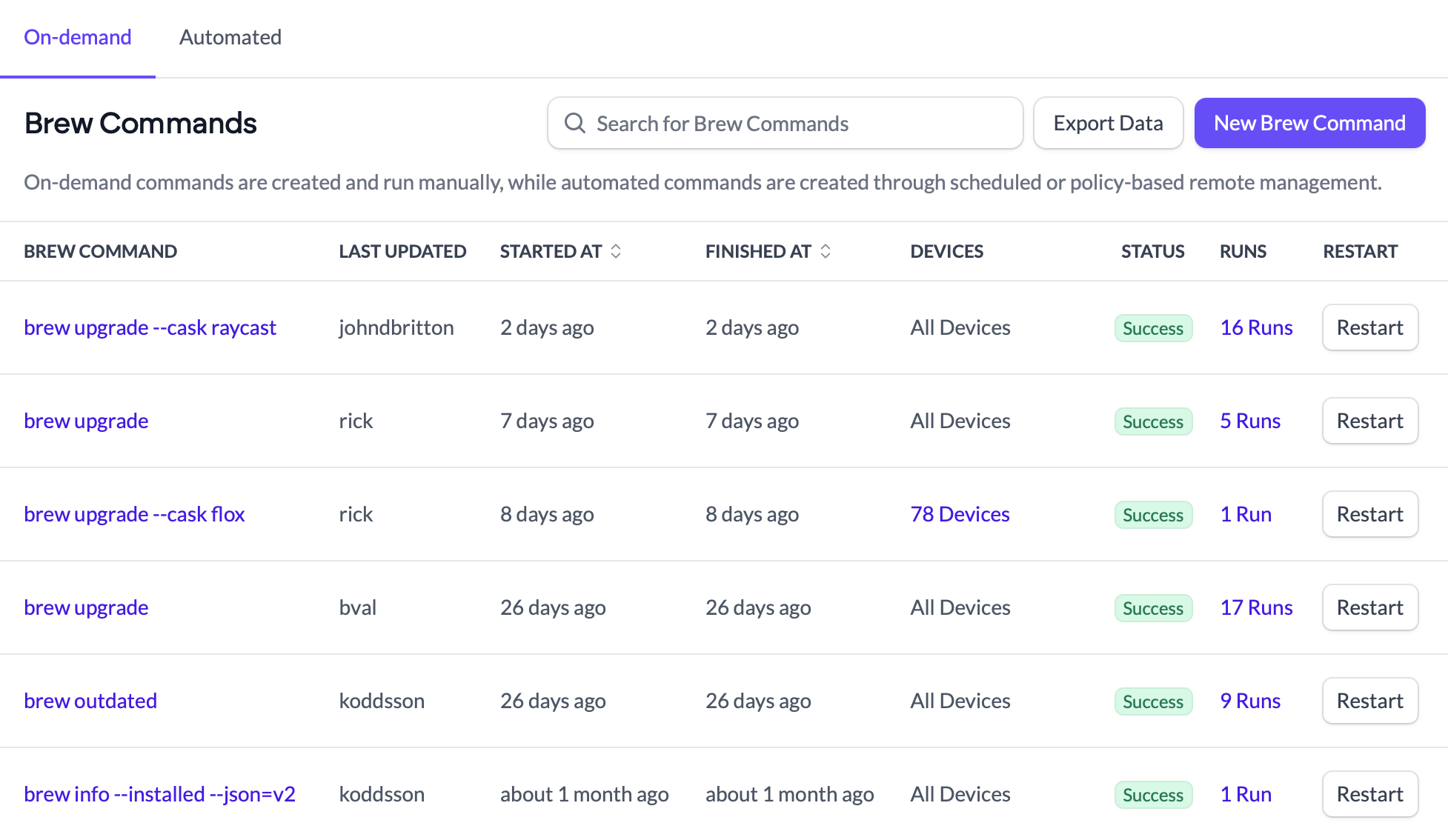
Commands are no longer required to have unique arguments across a workspace. Each time an admin writes and targets a command, it’s treated as a separate action with its own record and history. Re-running the same command no longer requires editing a previous one.
You can now also filter commands by creator, and the Console clearly distinguishes between on-demand, admin-initiated, and commands that were auto-generated by a policy.
Together, these changes make the Brew Commands list easier to reason about, audit, and manage.
For Admins:
- Create the same command multiple times without editing older entries.
- Filter Brew Commands by creator.
- See whether a command was created by a user or by the system.
- Clearer auditing and attribution for remote management commands.
For Your Team:
- Better visibility into who initiated changes.
- More predictable behavior when commands are re-run.
Brew Command ownership improvements are now available on Pro and Enterprise plans.
Console polish and usability improvements
Workbrew 1.7 also includes a number of UI refinements across the Console.
Tables are more consistent, removing unnecessary “card” UI. Readability is improved, and overall navigation has been improved. These changes reduce friction in day-to-day use and make common workflows feel more direct.
For Admins:
- Faster navigation and clearer data presentation.
- More consistent table and filtering behavior.
For Your Team:
- A more responsive and intuitive Console experience.
All Workbrew users will benefit from these improvements.
Show timestamps in your local time
Timestamps in the Console are now displayed in your local time zone.
Previously, times were shown in fixed UTC, which could create confusion when scheduling commands or reviewing activity across teams in different regions. Timestamps now automatically reflect the viewer’s local time, making audits and investigations easier to interpret.
For Admins:
- View activity, commands, and events in your own local time.
- Reduce confusion when reviewing logs across regions.
For Your Team:
- Clearer understanding of when actions occurred.
- Fewer timezone-related misunderstandings.
Local timestamps are now available on all plans.
Workbrew 1.7. Focused on clarity.
Comments or feedback? Reach out.