
Self-service app requests from the Terminal
Luke Hefson
Casks Allowlists keep macOS app installs predictable for fleets with Standard devices by letting admins choose which apps can be installed from the brew CLI. That gives teams a safe, auditable way to let developers install GUI apps without handing out sudo. The tradeoff is a common friction: a developer needs an app that is not on the allowlist and the only option is to go and file a ticket elsewhere and wait for an admin to see it, approve and update the allowlist.
Package Requests closes that gap. It adds a self service flow so developers can ask from the terminal, admins stay in control in the Console, and every decision is recorded for future reference.
Why this matters:
-
Developers can request software without leaving the CLI, which reduces ticket churn and context switching.
-
Admins stay in charge: they approve or deny requests, choose who the approval applies to, and add a short reason.
-
The workspace gets an auditable trail of approvals so future decisions are easier.
How it works for developers
-
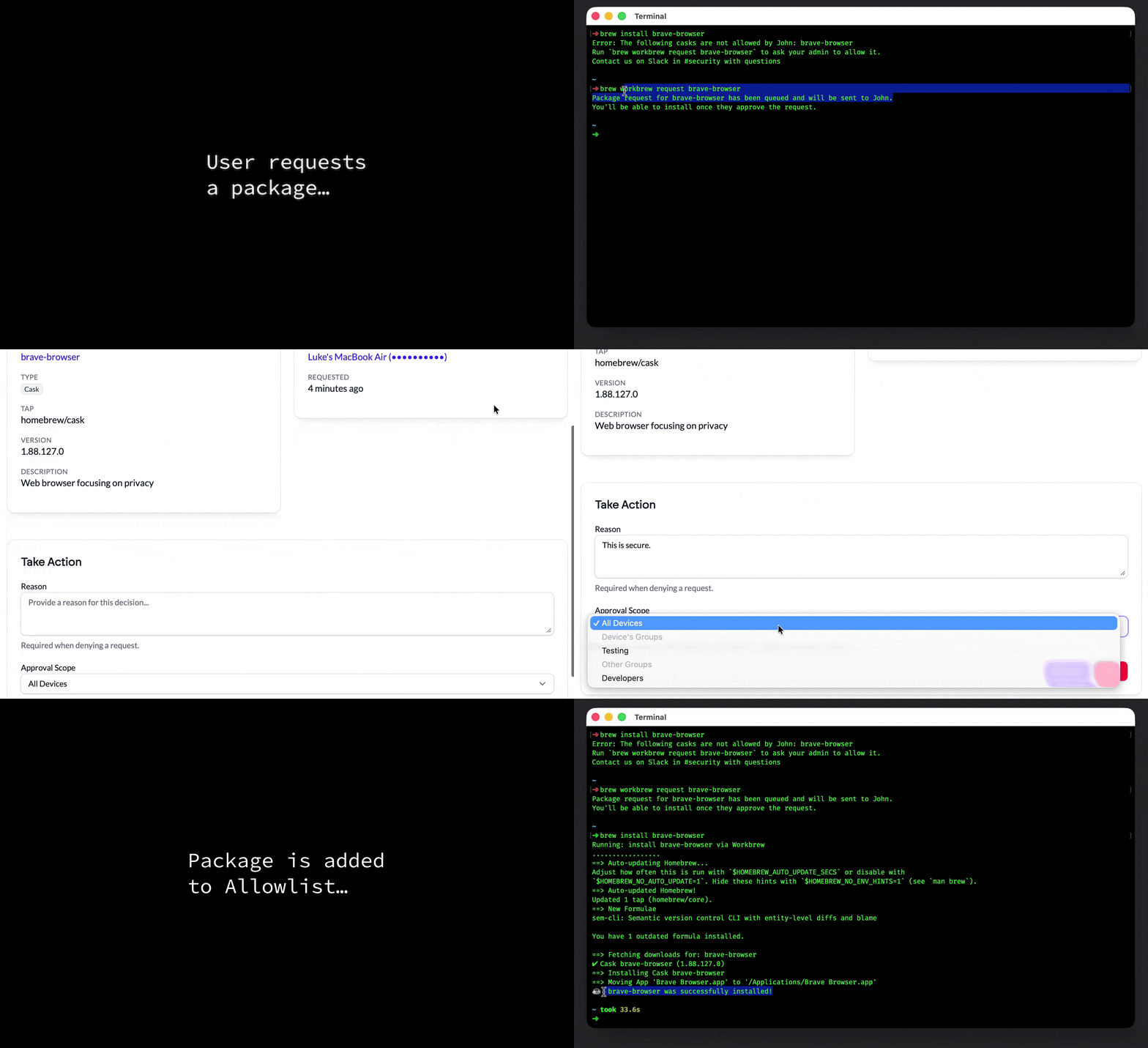
Try to install a cask the usual way, for example
brew install brave-browser. -
If the cask is not allowed the CLI explains why and suggests a one-line request command, for example:
Error: The following casks are not allowed: brave-browser Run brew workbrew request brave-browser to ask your admin to allow it.
- Run
brew workbrew request brave-browser. Workbrew queues the request and sends it to the Console. The CLI confirms the request has been submitted. Once an admin approves the request the developer canrun brew install brave-browseragain and the install will go through.
How it works for admins
Requests
Admins review incoming requests from the Package Requests page in the Console. Each request page shows package details, the requesting device and timestamps, the cask version and tap, and a short package description. From the review view an admin can Approve or Deny a request.
Approval scope
Approving a request adds the cask to the appropriate Casks Allowlist policy, targeting whichever approval scope the admin chooses. The dropdown is grouped to make common decisions fast:
-
All Devices, which makes the app available workspace-wide.
-
Device’s groups, which lists groups the requesting device already belongs to. Choose one of these to grant the requester access via a group they’re already in
-
Other groups, which lists every other device group in the workspace. Choose one of these to allow the app for a different group that does not include the requesting device.
After a decision
-
Approvals add the app to the allowlist at the chosen scope, and the requester can
brew installthe app immediately. There is no extra work for the developer after approval. -
Denials require a reason. Denied requests are visible in the Denied view and include the decision reason. Users may submit a new request if circumstances change.
-
The Console records a full history in the Activity Log, so admins can see who approved what, when, and why.
To enable Package Requests for your team today, reach out to your Workbrew account team for setup and best practices.
Package Requests require Cask Allowlist and are now available on the Enterprise plan only